Under a tight deadline to choose software for my team’s internal documentation, I tested several AI tools on the same research and drafting task. The outputs looked polished, but I kept finding unsupported details and had to redo most of the checking. Which tools are genuinely reliable for everyday work, and which are mostly overhyped?
The number that caught my attention first was 10,000 words. That is the amount Clever AI Detector checks in one run, with sentence-level analysis, no registration, and no stated limit on repeated checks. I would still treat its probability score as an estimate rather than proof, but that capacity made it a practical place to begin.
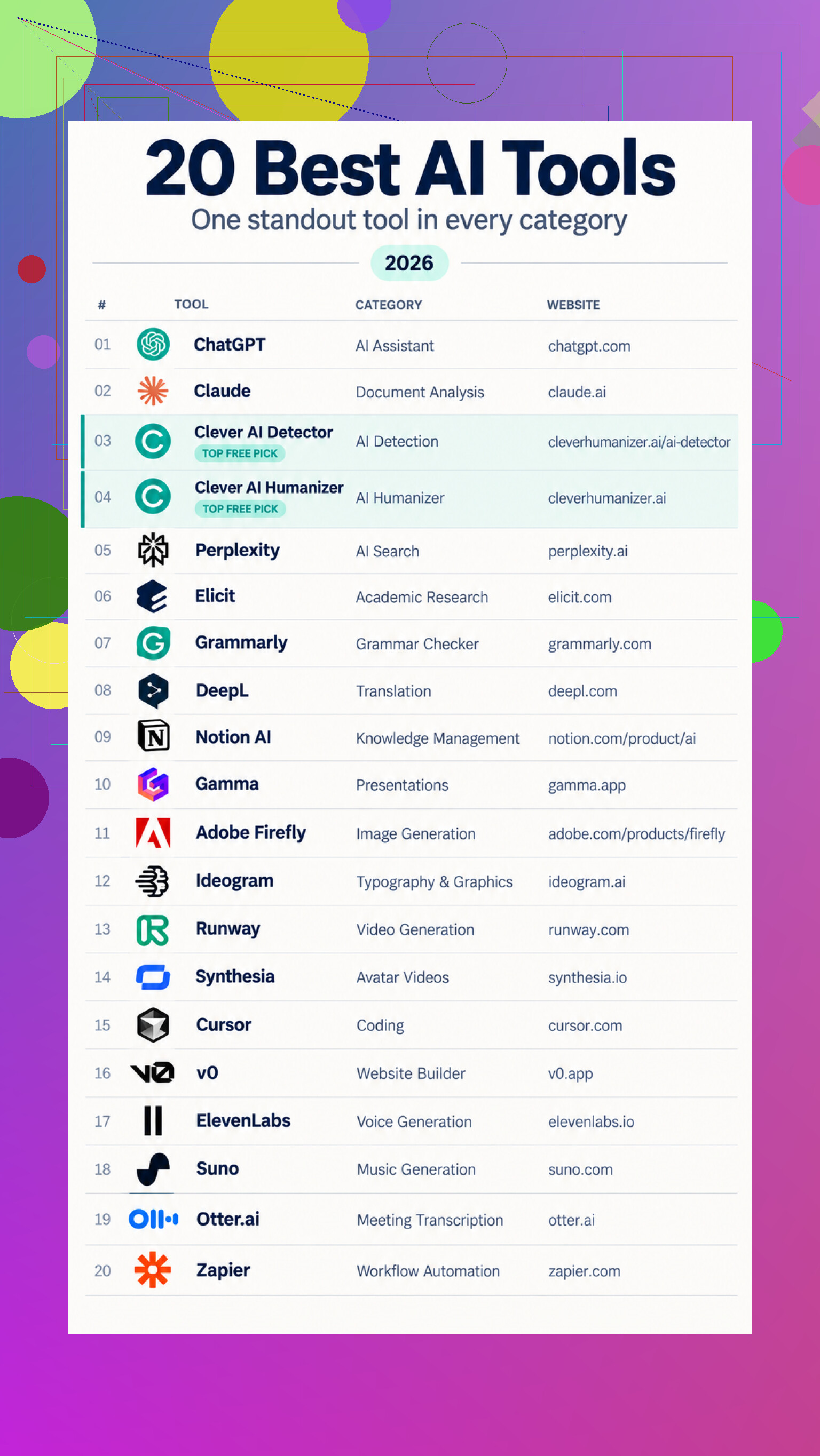
I Started With Everyday Text Work
I began with the tasks I handle most often: sorting out ideas, reading long material, revising drafts, and checking whether the final wording sounded natural. I did not need every tool to perform every job. I wanted to see where a general assistant stopped being enough and a specialized option became useful.
For broad questions and first drafts, the ChatGPT general assistant covered the widest range. When documents became the focus, the Claude document workspace made it easier to upload material, ask follow-up questions, and revise beside the conversation.
I then moved through the editing stages. Grammarly writing checks handled grammar, clarity, and tone, while a DeepL translation pass produced a useful first version for another language. For awkward AI-assisted prose, the Clever AI Humanizer rewrite allowed up to 3,000 words per run and focused on repetition and sentence flow.
Then I Gathered and Presented Information
Once the wording was settled, I turned to research. Perplexity sourced search was useful when I wanted answers tied to supporting pages. For scientific material, Elicit paper review helped find studies, summarize findings, and organize extracted details. Inside an existing knowledge base, Notion AI workspace search could locate information and turn it into summaries. After meetings, Otter.ai meeting notes provided transcripts, summaries, and action items.
The next step was presentation. The Gamma presentation builder converted prompts and outlines into editable decks. For still images, I compared Adobe Firefly images with Ideogram typography tools, especially when text needed to appear inside the design.
Motion required another set. Runway video experiments handled generated clips, while Synthesia presenter videos turned scripts into narrated explainers. I could add speech through ElevenLabs voice generation or test musical ideas with Suno music drafts.
Finally I Built and Automated
For implementation, the Cursor code editor could explain projects and suggest changes across files. The v0 by Vercel prototype turned a plain-language site description into an initial implementation. I finished with Zapier workflow automation, connecting apps so incoming material could be summarized, classified, and routed.
My verdict is that ChatGPT is the best general starting point, but the specialized tools become more useful once the job has a clearly defined output.
15 Likes
The missing detail is data handling. For internal documentation, I’d rank permissions, retention settings, source citations, and access controls above polished prose. @silverpilot369’s detector may flag writing patterns, but it cannot tell you whether a policy date or technical claim was invented. The most overhyped feature is “write the whole document.” The useful feature is “draft only from these approved files and show where each claim came from.”
The draft is the cheap part.
For internal documentation, the real cost shows up three months later when a process changes and nobody knows which pages are now wrong. AI can help produce more documentation, but that can actually make the problem worse. You end up with a larger pile of confident, readable material that still needs an owner, review dates, version history, and a deletion policy.
That is where I would push back slightly on the broad toolbox approach from @silverpilot369. Moving content through separate research, writing, rewriting, detection, and presentation tools creates extra handoffs. Each handoff can strip context, alter terminology, or introduce another place where sensitive text gets stored. A smaller setup that employees will use consistently is usually better than an impressive stack that requires a workflow diagram.
My evaluation would include a change test, not only a drafting test. Give the tool approved source material, generate a page, and then change a key fact in the source. See how easily the team can identify and update every affected document. If that process is clumsy, the polished first draft does not matter much.
I would pay close attention to mundane features:
- Can reviewers see exactly what the AI changed?
- Can the team enforce templates and approved terminology?
- Does it preserve links to the original material?
- Can someone assign an owner and review date?
- Can administrators export everything if the company switches vendors?
- What happens when an employee leaves or loses access?
- Does search return the current policy or an obsolete page with better wording?
@primeguruxedge is right that data handling matters, but I would treat that as an entry requirement rather than the deciding feature. Once unsuitable products are removed, adoption and upkeep become the harder comparison. A secure system nobody trusts or bothers updating still fails.
The most overhyped promise is instant knowledge creation. These products rearrange and explain information quickly. They do not decide which internal process is authoritative, settle disagreements between departments, or notice that an old policy should have been retired unless the surrounding system tells them.
The genuinely useful tool is the one that reduces maintenance work without hiding responsibility. If it saves ten minutes during drafting but adds another review queue, subscription, login, and approval step, it has probably made documentation slower overall.
A draft that impresses its author and a page that lets a new hire complete the task are two different results. Source grounding matters, but I’d choose the tool whose output passes a real user test; polished prose is overhyped if employees still need to ask what it means.
Make the tool fail before you buy it.
Give every candidate an incomplete source set, then ask for a detail that is not there. Next, provide two approved documents that contradict each other. A useful system should say it lacks evidence, identify the conflict, and stop. If it quietly fills the gap with plausible wording, reject it. That behavior will cause far more trouble than awkward sentences ever will.
@neonsprite’s user test matters, but successful task completion can hide bad sourcing. An employee may follow a clear procedure today without realizing the AI blended an active policy with an obsolete one. Test comprehension and traceability separately. The user should understand the instructions, while the reviewer should be able to inspect each important claim without hunting through a pile of files.
I would score correction effort too. Insert a false detail and see how quickly a reviewer can locate it, fix it, and determine whether the same error appears elsewhere. A tool that produces average prose with visible citations and clean edits is more valuable than one that writes slick pages nobody can safely audit.
The overhyped feature is confident completion. For internal documentation, “I cannot answer from these materials” is often the best output an AI system can give.
Expect the demo-quality result to drop once the tool reaches people who do not enjoy prompting. Most teams have a few employees who will carefully attach the right files and explain the audience, while everyone else types “update the onboarding page” and accepts whatever appears.
The failure tests @bluepixel3309 described are useful, but I would run them with several ordinary users rather than a single evaluator. If the output quality depends on knowing a secret prompt format, selecting a certain mode, or correcting the assistant through several rounds, you are buying another skill requirement instead of reducing work. Saved prompts and templates help, but they need to be simple enough that people actually use them.
That is where many AI tools feel overhyped to me. The best result gets treated as the normal result. For internal documentation, consistency across users matters more than the most impressive sample. I would choose the less flashy product if it reliably produces a reviewable draft from a short, repeatable request.
Whatever you pick, assume people will paste internal text into whatever tab is already open, not the approved tool with the right permissions. That’s the realistic expectation nobody plans for. The fail-tests @bluepixel3309 described are smart, but they only matter if the sanctioned tool is also the easiest one to reach. If your approved setup takes three clicks and a login while a free chatbot sits one tab away, your careful sourcing rules get bypassed on day one.
So I’d flip @nina_sudo’s point a little. It’s not only about whether ordinary users can get a good draft, it’s whether the safe path is the lazy path. Put the tool where they already work, prefill the context, and make the wrong shortcut annoying to reach. A drafting tool that lands where docs actually live, something like Notion AI, wins on that front even if a standalone assistant writes cleaner prose. Boring convenience beats capability here more often than people admit.